Building a Manuscript Preparation AI for Audio Book Narrators
Robert ·
The challenge
My wife is an audiobook narrator. There is a process around producing a professional audiobook. You don’t just ‘sit down and read’. The book has to be read several times first. The narrator has to become familiar with the storyline, characters, places etc. All of this can be captured under the process of ‘Manuscript Prep’. For fiction books this means that you have to understand the structure, dialogue (highlight in the manuscript), characters, places etc.
The typical approach is for the narrator to do this by reading the book and taking notes. This can be time consuming. So what if the computer can analyse the book and give your a ‘manuscript prep report’? It would save time and you will have a document that can guide you through the narration process. The narrator can spend their time recording the book rather than creating the report first.
Many narrators will hire a Manuscript Prep Report Writer. This allows them to focus on the performance and receive a report. This does of course incur a cost.
So, the challenge is to build a ‘Manuscript Prep AI’. And this is what I have been working on. There is one additional challenge: It is imperative that the manuscript does not leak onto the internet. Often the books have not been released yet and we have to protect the authors property. So this has made me want to process the manuscript locally. How hard can it be?
Creating the AI
You may have read my article about running my own AI locally on my workstation (OK, gaming rig 🙂 ). You can read about that in my other post (Running Ollama with AMD GPU Acceleration on Fedora). Now that the AI is set up on my system, I can put it to work.
Step 1 – Just ask the AI
So I started by simply asking the AI to analyse the manuscript (I used Treasure Island as my test because it is in the public domain). Of course, I quickly found out that this is not accurate. The AI (Deepseek-R1:14B) would not come back with enough characters, places etc.
So, rather than working on resolving any issues with the model myself, I started to use ChatGPT to discuss improvements. Very quickly I found myself going down the rabbit hole. It became clear very early on that I needed to do a lot of things. These are just a few that I have had to work on:
- Create a suitable Model File and SYSTEM prompt
- Convert the PDF to text
- Chunk the data
- Make sure the model only uses the manuscript file
- Make sure to use an appropriately sized model
- Tune performance (measure tokens/sec)
So I entered into an iterative process to develop and tune the model. And rather than using the Web GUI (OpenWebUI), Ollama gets run from a Python script. This allows for a pipeline to be created that runs everything required to create the manuscript prep agent. For nostalgia reasons I decided that I would quite like to do this in a TUI (Text User Interface) to give it that Cyberpunk Retro Feel. Why not have a bit of fun while we’re at it?
Step 2 – Manuscript Ingest
The manuscript ingest script prepares the manuscript for processing by the orchestrator. It reads the PDF and extracts the full text (Either OCR or text extraction). Then it cleans the text by removing page numbers, headers, footers etc. After having created the clean version of the manuscript it chunks up the data according to the settings it was given when started. I am currently using chunk of approximately 1200 words long. This seems to be a good size for the AI to be able to process reliably.
Step 3 – Orchestrator TUI
I will have to tell you that I am not a software engineer. So this is something I have asked ChatGPT to help with. Turns out it’s pretty good at spitting out working code. And, from past experience, I am at least able to read the code and see what it is up to. So, that’ll do for now. Vibe coding for the win. I guess we’re building a research project/prototype.
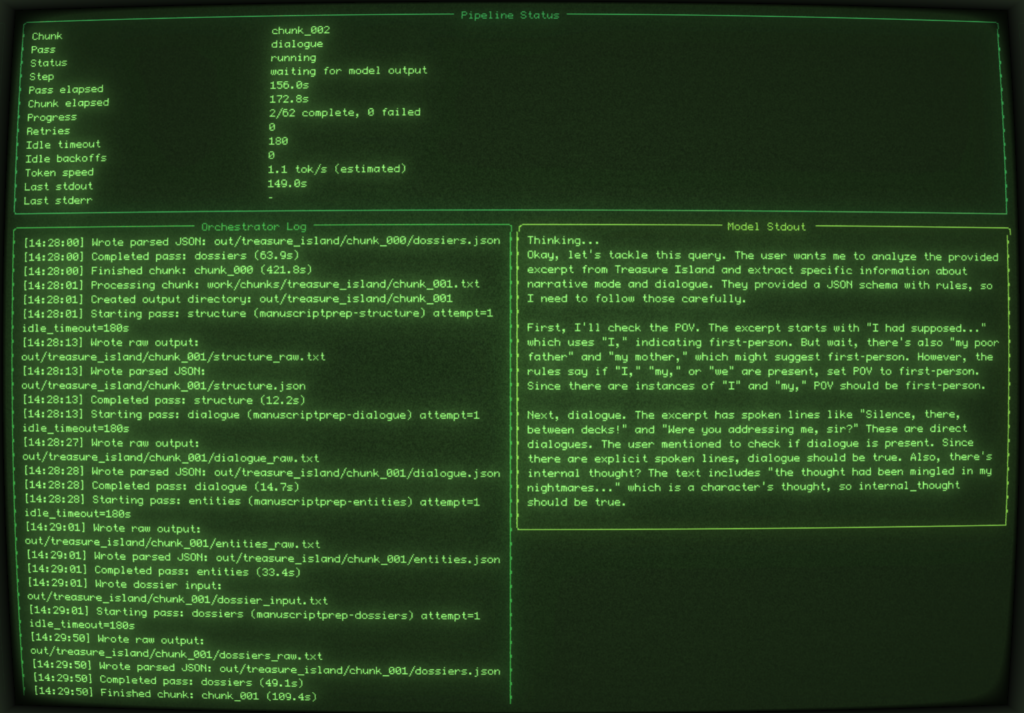
In the above screenshot of the TUI you can see that the orchestrator does a number of things. It cycles through the chunks and extracts structure, dialogue, entities and dossiers. Each of these are handled by a different model. Each tuned for this kind of content. Each of the four types of data it calls a ‘pass’. All four together represent a full ‘chunk’. The orchestrator also checks if the model is actually working or whether it is ‘stuck’. It can occasionally happen that the model is caught in a constraints loop or that it doesn’t strictly stick to the manuscript facts and wanders off into a ‘thinking loop’. When the model gets stuck like that, it may time out based on the timeout set for the pass. In the screenshot above the orchestrator uses a 180 second idle timeout for a pass. It also honours a number of retries. I have set this to 2 retries in this example (not visible in the TUI). There is also an ‘idle timeout backoff’ this means that for each retry the timeout window increases. In this example I have set this to 1.5. So the second pass is 270 seconds and the third pass is 405 seconds. This increases the chances that the pass will succeed on the next try.
So where are we now?
At this point the orchestrator runs four passes on each chunk and the model pushes out structured JSON for all of the information it finds in the document. This is all stored in a directory specific to the manuscript.
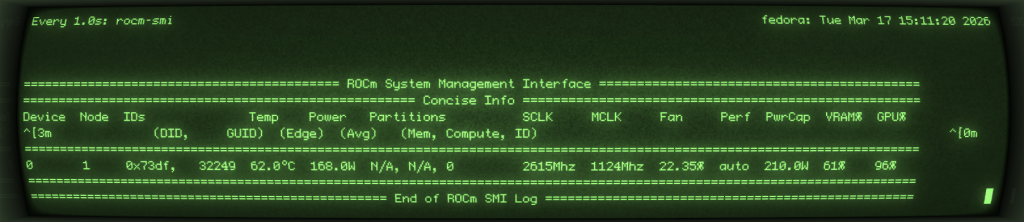
I have also swapped to qwen3:8B-q4_K_M. With this model there is more headroom in VRAM and I get approximately 30 tokens/sec rather than the 8 tokens/sec with the larger model. I am now GPU constrained rather than VRAM constrained. This is better for throughput. As you can see in the screenshot below, the GPU is at 96% and VRAM at 61%.
There is a lot more to do. Once the orchestrator process generates reliable outputs, all the chunk outputs have to be merged. This is the third step in the pipepline and will generate the final ‘manuscript prep report’. I have not built this yet.
Once I have the full pipeline and I can generate the report, it will be time to optimise the flow. It seems obvious that we can parallelise the flow to a great extend. However, I don’t have a farm of GPU servers that will be able to do this. So I run locally and all the passes are handled in sequence. This means that the process takes hours, not minutes. Mind you, that it still better than the days it took for the narrator to prep a manuscript. And of course the model can work when the narrator is sleeping. So there is no real time lost. Right now the run just has to be planned for the results to be delivered on time. The final goal is to run the prep in minutes.
What next?
Merging into a Manuscript Prep Report
The merge step needs to be created next. This will create the report and means that I can do end-to-end testing of the flow. This will inevitably lead to the need to re-run failed chunks and re-merge the output. But that is something the testing will point out.
Once the merger script works, I can do some exciting stuff with parallelising the work. Each pass can run on its own host/container. They can run in parallel. Then each chunk can be launched in parallel. In the example of Treasure Island, I have 62 chunks. This means that there are 4 x 62 = 248 passes. All of which can run in parallel.
Optimising and Parallel Processing
I’ll have to consider running these passes in the cloud and using cloud architecture. Simply because I do not have 248 nodes at home. Perhaps with Kubernetes or Docker Swarm or some other way to parallelise the jobs. In theory the entire run can be done in less than 4 x 180 = 720 seconds (12 minutes). In reality the chunks take less time than that. So 12 minutes is the worst case scenario.
Security
But, do you remember that we have to keep the manuscript safe? I cannot leak the manuscript to the internet. Of course running in the cloud poses some security issues. So I need to make sure that data is secured and protected during these runs. I will have to build in security measures for this.
Bonus Feature – Power Draw and Usage Cost
I’d like to build a feature that records or estimates the power draw by the host system. This will help to calculate the electricity use during a run. As you can see in the ROCM-SMI screenshot above, the power draw during the run (from the GPU) is 210 Watts.
The example run took 5h35m. I pay 30p/kWh. So it cost: 0.210kW x 5.6hrs x 30p = 35p
That does not seem like a lot. But I suppose it could add up. And we may have to double it because the entire system load may have been 450Watts. Also, I may have had to pay a person £20 x 10hrs = £200. Quite a bit more.
The ethical question
People are asking themselves if people will lose their jobs because AI will replace it? Well, you might say that the Manuscript Preparation Person is going to lose their job. However, I have already found out that configuring and running a reliable replacement for the Manuscript Prepper is a day job. So far I have probably spent 40 hours building where I am now. It will take me a lot more hours before this project is product-grade. Can it be used before then? Absolutely! In ‘Beta’. Don’t expect to be done with manual prepping yet. But, the model will continue to improve. It will be ready soon enough. So the role of the traditional Manuscript Prepper may be to build an AI that is great at doing this. After that this is merely a service to the narrator. One that can be improved and maintained by a ‘Manuscript Preparation AI Custodian’.
In the mean time, I have to put more time and effort into the model and pipeline to make it production ready.